01
A personal invitation, with a clear purpose
Your customer receives an invitation naming your company and explaining what participation means. They are invited to share their real experience—not handed a script or asked to make claims they do not believe. The invitation includes three visual steps so they can see what comes next before deciding to join.
Example invitation · Acme invited you to Proofly
Acme values your experience.
Hi Alex,
Acme has invited you to earn money as a customer reference on Proofly. Share your experience with potential customers, choose which requests to accept, and earn instant cash payouts for completed conversations. Think uber but for customer references.
Review invitationThe button opens their invitation in the browser. No app-store download is needed. If an email does not arrive, check the address and spam folder rather than assuming delivery.
02
A short account setup, with explicit consent
The invitation identifies your business. Your customer signs in or creates an account using the same email address you invited. They then choose a bank-account or debit-card payout preference and review a separate SMS consent checkbox naming your business.

INVITED BY ACME
Welcome to Proofly.
Your experience has value.
Full name
Email address
Password
Use the same email address that received your invitation. Email confirmation may be required.
Create a reference account
An email-based account example, using the invitation address.
Illustrative wireframe · Fictional details
ALAcme invited you to be a customer reference.
Share your experience. Choose the conversations that work for you.
Signed in as
Payout preference
I agree to receive SMS reference requests from Acme. Frequency varies. Message & data rates may apply. Reply STOP to opt out, HELP for help.
This saves a payout preference. Financial details are collected separately through Stripe.
Accept the invitation
A clear company invitation, payout preference and explicit SMS consent.
Illustrative wireframe · Fictional details
The current acceptance flow requires that consent checkbox before joining. Customers can opt out from their Businesses tab. Do not describe it as automatic enrollment or tell customers they can skip consent in the current flow.
If they open a request while signed into a different linked account, Proofly warns them and offers account switching rather than showing an unusable Accept button.
03
Financial details stay with Stripe
Choosing “Bank account” or “Debit card” saves a preference—it does not collect their financial details. Actual payout setup opens Stripe’s hosted onboarding, where Stripe collects the account and verification information it needs. Your sales team does not need to collect card or bank details from the customer.
Secure hosted onboarding · example
Where should we send your payouts?
Cardholder name
Test debit card
Expiry
Security code
Country
Stripe may request identity verification and additional details. Eligible destinations vary.
ContinueIllustration only. Never enter real financial details into a test setup.
Secure payout setup
Illustrative Stripe-hosted test setup; actual Stripe fields vary.
Illustrative wireframe · Fictional details
ALPayout setup
Test account connected
Your Stripe test setup is ready for eligible test rewards.
Live transfers remain locked. Instant eligibility is checked separately.
Check payout readiness
Return to the app and check test account setup status.
Illustrative wireframe · Fictional details
Stripe may ask for identity or other verification details. Requirements vary by account and destination. Do not promise that every debit card qualifies for instant payouts or that setup always takes a fixed number of minutes.
Today this is test onboarding, not live bank/card activation. Before real payouts launch, live verification, funding and payout eligibility must be confirmed.
04
One familiar place for requests, messages and earnings
The reference app opens directly in their browser and is designed around the customer’s tasks—not your sales dashboard. It can be added to their home screen as a PWA without an app-store download.
Requests
Review opportunities and decide whether to participate.
Messages
Keep preparation notes and meeting links in the conversation.
Earnings
See reward records and payout status.
ALYour customer reference network
Good things ahead.
$40.25
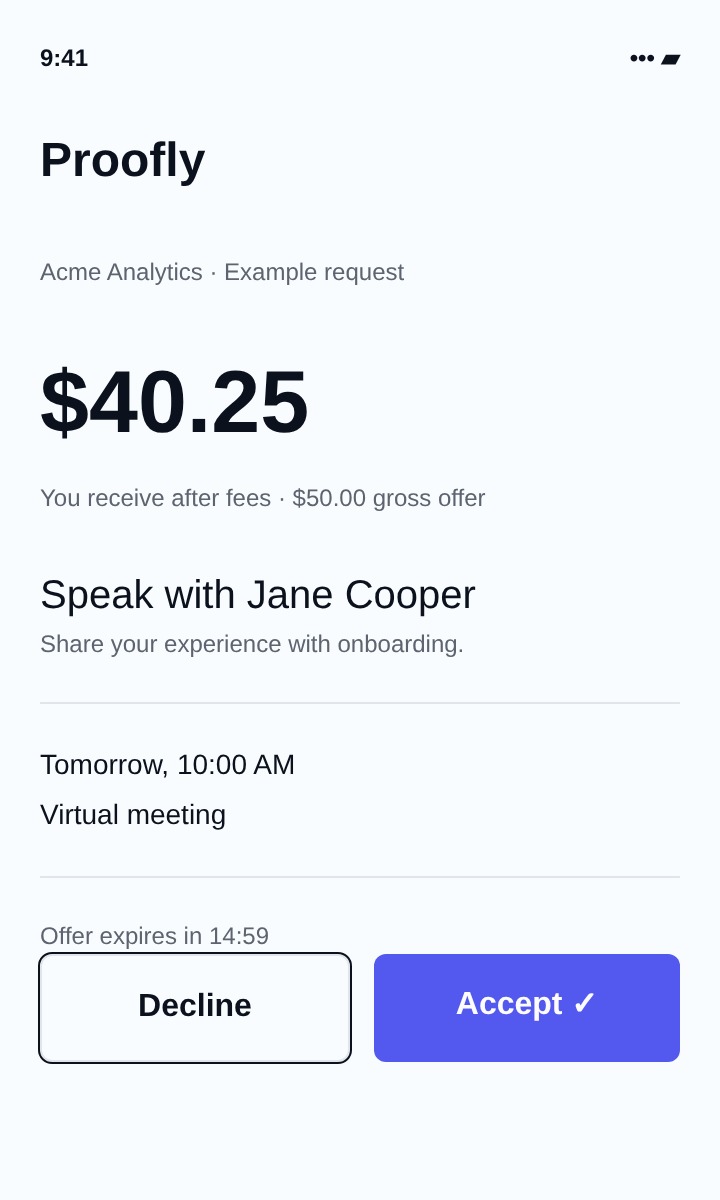
You receive after fees · $50.00 gross offer
Speak with Jamie Chen
Share your experience with onboarding and adoption.
Tomorrow · 10:00 AM
Virtual meeting
Offer expires in 14:32
Your reference app
Requests, net rewards and scheduled conversations in one place.
Illustrative wireframe · Fictional details
They do not need to learn a full CRM to help you. A request stays connected to its conversation, and the Businesses area lets them review their participating relationships and opt-out controls.
05
A request they can understand before accepting
Requests show who the prospect is, what they want to discuss, the conversation format, scheduled time and offered reward. The net reward and gross offer are shown separately, with any conditional conversion bonus, so a customer is not surprised by deductions later.
They can accept or decline. The acceptance window is 15 minutes; accepting does not mean the conversation must happen immediately—the scheduled time is shown in the request. In a first-to-accept request, another reference may take the opportunity first.
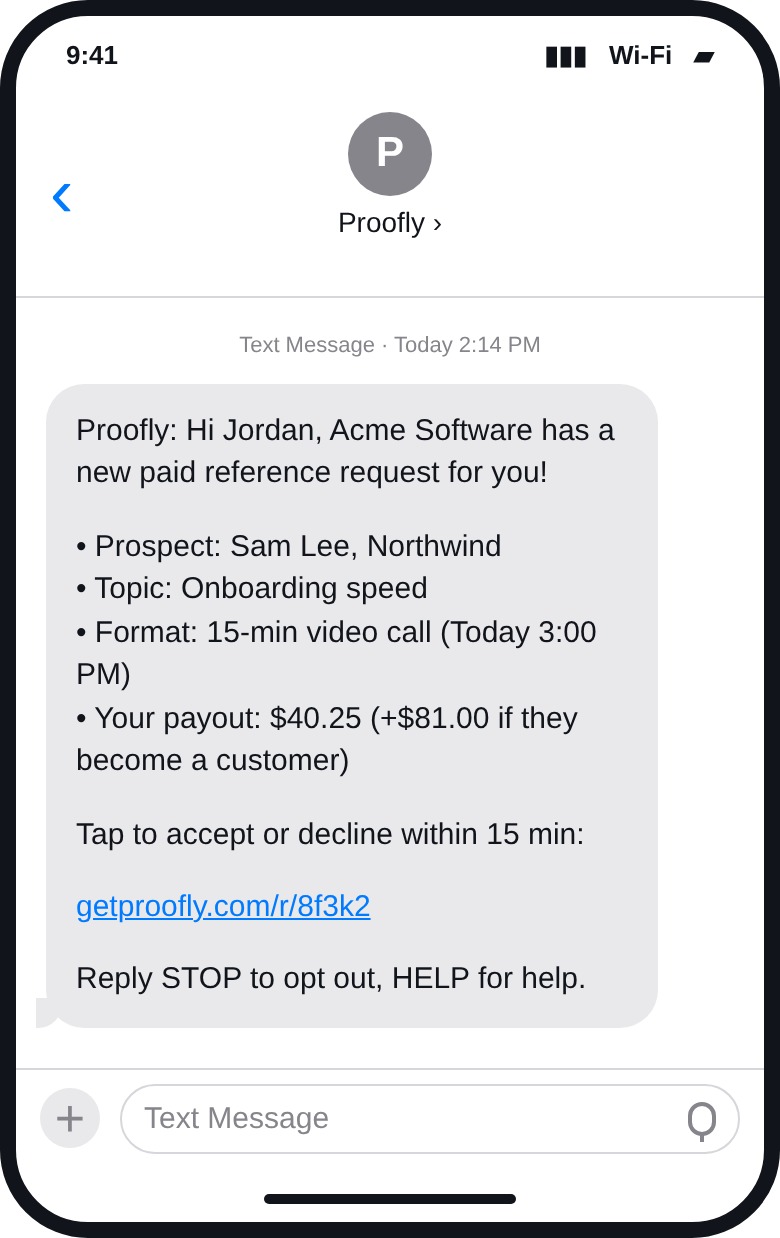
A request email opens the same reference app. Once SMS is enabled and consent is in place, a text request will include a link to review the opportunity there. The text is an invitation to review—not an automatic commitment.
SMS is not sending today. Avoid telling a customer a text was delivered just because a request or link was created.
06
Keep the conversation human
Acceptance opens Messages, where the customer can exchange preparation notes and updates with your team. An available meeting link is shown on the accepted request. Keep context concise: what the prospect cares about, when to meet, and who to contact if plans change.
After the conversation, the customer submits an image screenshot as proof of completion through the app. The current uploader accepts images under 10 MB. Completion records the reward and makes the proof available for business review; a recorded reward is not, by itself, confirmation that money reached their bank.
Jamie Chen · Reference conversation
Today 9:41 AM
Perfect. Here’s the meeting link.
Join virtual meeting ↗
Sent · 9:43 AM
A familiar conversation
Meeting context and preparation notes in a texting-style thread.
Illustrative wireframe · Fictional details
ALCompleted your conversation?
Upload proof for your conversation with Jamie Chen.
Image selected · 482 KB
Images under 10 MB. Avoid unrelated private conversations or sensitive information.
Submission records the reward. Recorded does not mean paid.
Submit conversation proof
Choose an image and submit proof after the conversation.
Illustrative wireframe · Fictional details
Ask only for the minimum evidence needed. Encourage customers to avoid uploading unrelated private conversations or sensitive customer information.
07
A clear reward record and deliberate cash-out
Earnings shows the customer’s reward records and payment activity. When eligible test earnings are available, they choose an amount from the available whole-reward totals and slide to confirm cash-out. A progress indicator appears while the payout is processed, followed by the provider’s confirmed or pending result.
ALYour earnings
Available test earnings
$40.25
1 completed test reward
Payment activity
Acme · Jamie Chen
Gross $50.00 · Combined fee $9.75
Test earnings are not real money. Live transfers are locked.
See your earnings
Test rewards, payment activity and available cash-out balance.
Illustrative wireframe · Fictional details
ALCash out
Selected test earnings
$40.25
1 whole reward · $40.25 available
Bank or eligible debit card
Provider processing may take time. Confirmation shows the actual test payout result.
Choose an amount
Select available whole rewards and slide to confirm a test cash-out.
Illustrative wireframe · Fictional details
ALTest payout confirmed
$40.25
Stripe confirmed this test payout. No real money was moved.
Live arrival depends on eligibility and available funds. Pending payouts show a pending result instead.
See the payout result
A provider-confirmed test result; not a live transfer or guaranteed arrival.
Illustrative wireframe · Fictional details
Instant arrival depends on the customer’s destination, eligibility and available funds. Pending is not paid. A conversion bonus is conditional on your business marking the prospect as a customer; it is not earned simply by accepting the request. If your team adds a tip, the customer receives 100% of that tip.
For example, a $50 gross request reward leaves $40.25 after Proofly’s combined 15% platform fee, 3.5% transaction fee and $0.50 processing fee. Offers vary by business and request.
08
Your customer comes before the request
Proofly provides the structure; your team sets the tone. Your customer has already placed trust in your business. Treat their time, privacy and willingness to help as something earned, never something owed.
- Ask thoughtfully. Confirm they are comfortable being a reference before sending an invitation.
- Respect every decline. Do not pressure a customer to accept or interpret a decline as dissatisfaction.
- Make the ask specific. Share a realistic agenda, accurate time and useful prospect context.
- Protect their time. Coordinate requests within your team and avoid repeatedly approaching the same customer.
- Be honest about rewards. Explain conditional bonuses, test mode and payout timing before expectations are set.
- Stay personally available. If onboarding or a meeting needs help, keep a human point of contact from your business.
The best reference experience leaves your customer feeling valued, informed and in control—and your business confident that its relationship was treated with care.